Flash Airscope Firmware#
The assembled Airscope needs to be programmed to run the Airscope firmware before use.
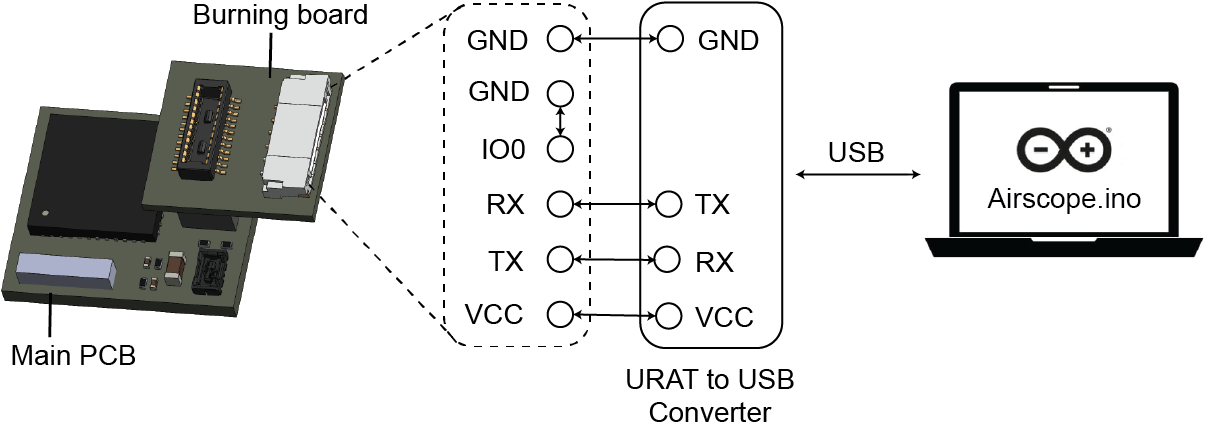
Cable connection for flashing#
Connect the burning board to the main PCB.
Connect the UART pins to the USB converter following the diagram: GND to GND, RX to TX, TX to RX, and VCC to VCC. Then connect the USB converter to the computer.
Before flashing, connect IO0 to GND. This puts the ESP32 into flashing mode.
Flashing the firmware with Arduino IDE#
Download and install the Arduino IDE. Then install ESP32 board support through the Arduino IDE Boards Manager. See the official ESP32 Arduino installation guide.
Download the firmware from the GitHub repo, and open
Airscope.inoin the Arduino IDE.Select
AI Thinker ESP32-CAMas the board, then clickUpload.After the upload is complete, disconnect IO0 from GND. Power-cycle the board to restart it in normal running mode.